Timesheet calculator with breaks
Enter your shifts
Enter the start, finish and unpaid break for each day. The calculator adds up the week, also when a shift ends after midnight, and shows the total in decimals, the difference with your contract hours and, with an hourly rate, the pay.
Does a shift end after midnight? Just enter the end time; it counts on into the next day.
- Monday8:00
- Tuesday8:00
- Wednesday8:00
- Thursday8:00
- Friday8:00past midnight
- Saturday–
- Sunday–
Worked this week
40:00 hrs
40 in decimals
Difference with your contract: +2:30 over
Pay for the week, before deductions\u2013
What this timesheet calculator works out
For each day the calculator takes the finish time, subtracts the start time and the unpaid break, and shows the hours worked. It adds the days up to a weekly total in hours and minutes and in decimal hours, the format most payroll systems ask for. Enter contract hours and it shows how far the week is over or under them. Enter an hourly rate and it multiplies the decimal hours by it, so you see the pay for the week before tax, National Insurance and other deductions.
A shift that ends after midnight counts on into the next day. You enter 22:00 to 06:00 as it is, without splitting the shift over two dates.
How to use the timesheet calculator
Enter the start and finish time for each day you worked, on the 24-hour clock.
Enter the unpaid break for each shift in minutes. Leave paid breaks out, because they stay part of the hours.
Working the same hours Monday to Friday? Fill in Monday and use "Copy Monday to all weekdays".
Check the contract hours and add an hourly rate if you want the pay for the week.
The calculator works in your browser. Nothing you enter is sent anywhere or saved, so a reload starts with the example week again.
A worked week: from clock times to hours and pay
This is the week the calculator shows when it opens: four day shifts and a Friday evening shift in a bar that runs past midnight.
Day | Start and finish | Unpaid break | Hours |
|---|---|---|---|
Monday | 09:00-17:30 | 30 min | 8:00 |
Tuesday | 09:00-17:30 | 30 min | 8:00 |
Wednesday | 09:00-17:30 | 30 min | 8:00 |
Thursday | 09:00-17:30 | 30 min | 8:00 |
Friday | 17:00-01:30 | 30 min | 8:00 |
The week comes to 40:00, or 40.00 in decimals. On a 37.5-hour contract that is 2:30 over. At a rate of £14 an hour, used here only as an example, the pay for the week before deductions is £560.
Minutes are where hand-written totals go wrong. A shift from 08:15 to 16:45 with a 45-minute break is 7 hours 45 minutes, which is 7.75 in decimals and not 7.45. The minutes-to-decimal table is on our page about the timesheet, with the rest of what a timesheet records.
Breaks, overtime and what the calculator leaves out
Only unpaid breaks come off. If your staff are paid for a 15-minute break, enter 0 for it, or the calculator takes paid time away.
Hours over the contract show up as the difference, but the calculator applies one rate to every hour. Whether extra hours earn a higher rate depends on the contract: UK employers do not have to pay a premium for overtime, as long as average pay across all hours stays at or above the National Minimum Wage. If your overtime is paid at time and a half, work out the extra hours separately.
The calculator covers one week at a time. For a fortnight or a month, run each week and add the totals, or keep the weeks in the Excel timesheet template, which adds them up for you.
When a calculator is not enough any more
For one person checking their own week, a calculator is quick. For a manager doing it for fifteen people, it means copying times from a punch clock, a message thread or paper sheets every week, and chasing the shifts that have a start and no finish.
In Shiftbase the hours come from clocking in and out in the app or on the Kiosk, a web page on a shared PC or tablet where each person enters their own PIN. Breaks are part of the registration, managers approve or decline each one, and the payroll report exports the approved hours to Excel or CSV.
Frequently asked questions
To calculate hours worked with a lunch break, subtract the start time from the finish time and take off the unpaid lunch. A shift from 09:00 to 17:30 with a 30-minute lunch is 8 hours 30 minutes minus 30 minutes, so 8 hours. Enter the lunch in the break column of the timesheet calculator and it does this for every day.
The timesheet calculator counts a shift that ends after midnight into the next day, so you enter the times as they are. A shift from 18:00 to 02:30 with a 30-minute break comes out at 8:00, and the row is marked as running past midnight.
To convert hours and minutes to decimals, divide the minutes by 60 and add them to the hours. 7 hours 45 minutes is 7 + 45/60 = 7.75, and 20 minutes is 0.33. The timesheet calculator shows the weekly total in decimals under the hours and minutes.
The timesheet calculator shows how many hours a week is over the contract, but it applies one hourly rate to all of them. UK law does not set an overtime rate, so the premium, if any, comes from the contract; how that works is explained under UK overtime laws.
The timesheet calculator is free and needs no sign-up. It runs in your browser and does not save or send what you enter.
The timesheet calculator works one week at a time. For a fortnightly or monthly pay period, calculate each week and add the totals; the decimal totals add up directly.
UK employers do not have to keep timesheets as such, but they must keep records that show compliance with the Working Time Regulations for two years and National Minimum Wage records for six years. What a timesheet should hold to cover both is set out on our glossary page.
The best way to plan your shift team.
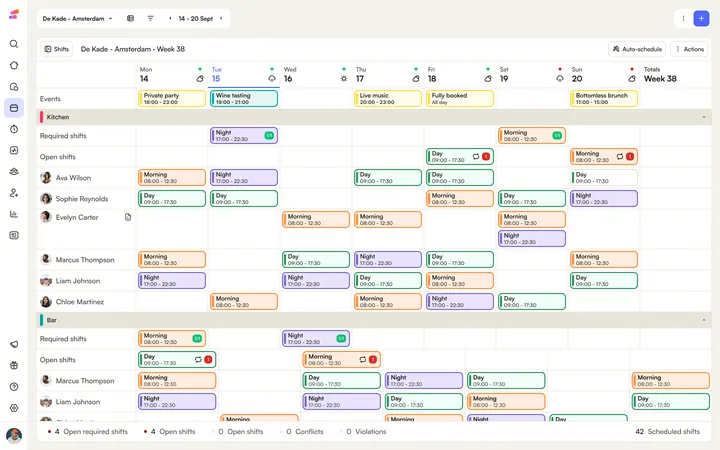
A template gets you through this week. Shiftbase keeps the rota, the hours, and the absence in one place for every week after that.
See all downloads
- Timesheet calculator with breaksAdd up a week of shifts with breaks, including shifts past midnight, and see the total in hours, in decimals and as pay for the week.
- Schedule in ExcelFree Weekly Excel schedule template. With this planning template, you can easily create your own clearly organized work schedule.
- Free timesheet template in ExcelA free weekly timesheet template in Excel for up to 15 employees. Enter clock-in, clock-out, and breaks, and the hours add up for you.
- Time card templateShiftbase offers a 100% free time card template in Excel. Download it to start working more efficiently and productively today!
- Shift Planning in ExcelShiftbase offers a 100% free planning sheet in Excel. Download the template to start working more efficiently and productively today!
- Roster Template in ExcelShiftbase offers a 100% free roster template in Excel. Download the file to start working more efficiently and productively today!
- Attendance sheet in ExcelShiftbase offers a 100% free attendance sheet in Excel. Download it to start working more efficiently and productively today!
- Employee offboarding ChecklistDownload the employee offboarding template and ensure a seamless offboarding process
- Employee Turnover calculator excel templateDownload our free employee turnover calculator template and discover the true costs of employee turnover in your business.
- Employee Cost Calculator Excel TemplateDiscover how to accurately calculate the total cost of your employees with this step-by-step guide. Learn the essential components that contribute to the overall employee cost and gain valuable insights to optimize your business expenses.
- PTO Accrual CalculatorDitch PTO calculation headaches! Our FREE template tracks accrual & empowers employees. Time freedom awaits!
- Payroll Slip templateDownload our efficient payroll template for HR: automate calculations and manage employee data.
- Time off Request TemplateDownload this free time off request form template that helps you simplify the approval process and ensure fair treatment of all employees.
No downloads match your filters.