Excel template for a Pitman schedule
Written by: Rinaily Bonifacio
This Excel template sets up a Pitman schedule for four crews on 12-hour shifts. Enter the date the cycle starts and it fills in 53 weeks of day and night shifts, in a fixed version and a rotating one, and counts each crew's hours per workweek, with the hours above 40 marked as overtime.
What's in the Pitman schedule template
A "Start here" sheet for the start date, shift times, hours per shift, crew names and the 14-day cycle as On and Off cells
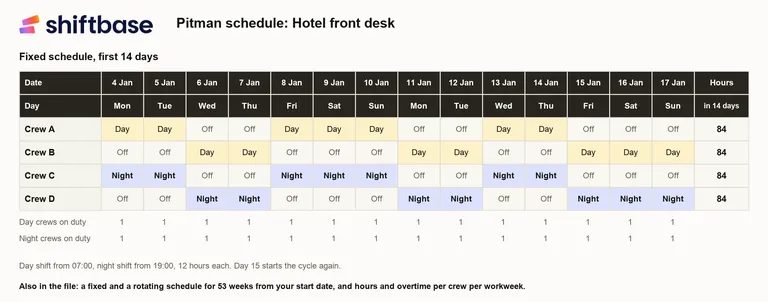
An overview of the first 14 days per crew, ready to print
A fixed schedule for 53 weeks, with crews A and B on days and crews C and D on nights
A rotating schedule for the same weeks, in which the crews swap days and nights every 14 or 28 days
Hours per crew for every workweek, the hours above your overtime threshold and the totals for the year
A check on every day that exactly one day crew and one night crew are on duty
How to use it
Download the file and open it in Excel. On the "Start here" sheet, fill in the white cells: the post or team, the start date and the shift times.
Give the crews their names. Crews B and D follow the same cycle as A and C, seven days later, so they relieve each other.
Pick the version you run: "Fixed schedule" keeps the night crews on nights, "Rotating schedule" swaps days and nights after 14 or 28 days.
Set the day your workweek starts and your overtime threshold, then read each crew's hours on the "Hours per week" sheet.
Print the 14-day overview, or a few months of the year, and put it where the crews can see it.
How the template counts hours and overtime
Each crew works 7 shifts of 12 hours in every 14 days: 84 hours a fortnight, or 42 a week on average. Those 84 hours never fall as 42 and 42. With the cycle and the workweek both starting on a Monday, crew A works 60 hours in the first week and 24 in the second. Under the Fair Labor Standards Act every hour over 40 in a workweek is overtime, paid at one and a half times the regular rate, and hours cannot be averaged across two weeks, so the template shows 20 overtime hours for that fortnight.
Let the workweek start on a Wednesday and the same shifts split into 48 and 36 hours, which is 8 overtime hours a fortnight instead of 20. Over 26 fortnights that is 208 overtime hours per crew instead of 520. Under 29 CFR 778.105 the workweek is a fixed run of 168 hours that may start on any day and at any hour, and an employer can only move it for good, not to avoid overtime. The template counts each shift in the workweek in which it starts, so a workweek that begins at a shift change, such as 07:00, keeps every 12-hour night inside one week.
Outside the US, set the threshold to the weekly hours in your contracts. Why the same cycle is also called 2-3-2 or 2-2-3, and what the UK Working Time Regulations say about 12-hour nights, is explained in the glossary under Pitman schedule.
Where the spreadsheet stops
A spreadsheet works while four crews cover one post and nobody swaps. It gets harder once leave, sickness and swaps come in. Every absence on a Pitman schedule leaves a 12-hour gap, and the file cannot tell you who is available to cover it or how many hours that person has already worked this week.
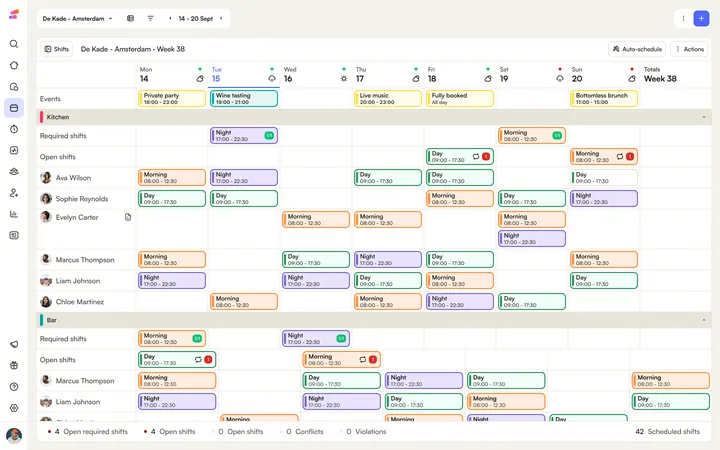
When you schedule shifts in Shiftbase, the day and night shift are set up once with their times, and a finished fortnight can be copied into later weeks. The required shifts show per department and team whether every day and night has its person, and availability, contract hours and approved leave are visible while the gaps are filled, automatically or by hand. Employees see their shifts in the app, and clocked hours show what each crew actually worked.
Frequently asked questions
The Pitman schedule template is free to download, without signing up. You can adapt it for your own team and copy it as often as you need.
The Pitman schedule template is built for Excel and uses standard functions such as INDEX, MOD, COUNTIF and COUNTIFS, which Google Sheets supports as well. After uploading it, check that the dropdowns on the "Start here" sheet came across.
The template makes a 2-2-3 or Panama schedule too, because both use the same 14-day cycle as the Pitman schedule: 2 days on, 2 off, 3 on, 2 off, 2 on and 3 off. For crews that switch between days and nights, use the "Rotating schedule" sheet.
On a Pitman schedule whose cycle starts on a Monday, a workweek that starts on a Tuesday, Wednesday, Thursday, Saturday or Sunday gives each crew 8 overtime hours every 14 days, and a workweek that starts on a Monday or Friday gives 20. Enter both start days in the template and the "Hours per week" sheet shows the split.
The shift length and the cycle can both be changed on the "Start here" sheet: enter the hours counted per shift and set each of the 14 cycle days to On or Off. A check then shows whether every day still has one day crew and one night crew on duty.
The template counts a night shift that crosses midnight in the workweek in which it starts, so a shift from Sunday 19:00 to Monday 07:00 belongs to the week that holds the Sunday. To match that in payroll, let your workweek start at a shift change, such as 07:00; the FLSA allows a workweek to begin at any hour.

Rinaily writes for Shiftbase about HR, scheduling and building teams people actually want to work in. She turns the messy reality of workforce planning into practical advice you can put to work today.
The best way to plan your shift team.
A template gets you through this week. Shiftbase keeps the rota, the hours, and the absence in one place for every week after that.
See all downloads
- Excel template for a Pitman scheduleAn Excel template for the Pitman schedule: four crews on 12-hour shifts, a fixed and a rotating version for 53 weeks from your start date, and each crew's hours and overtime per workweek.
- Timesheet calculator with breaksAdd up a week of shifts with breaks, including shifts past midnight, and see the total in hours, in decimals and as pay for the week.
- Schedule in ExcelFree Weekly Excel schedule template. With this planning template, you can easily create your own clearly organized work schedule.
- Free timesheet template in ExcelA free weekly timesheet template in Excel for up to 15 employees. Enter clock-in, clock-out, and breaks, and the hours add up for you.
- Time card templateShiftbase offers a 100% free time card template in Excel. Download it to start working more efficiently and productively today!
- Shift Planning in ExcelShiftbase offers a 100% free planning sheet in Excel. Download the template to start working more efficiently and productively today!
- Roster Template in ExcelShiftbase offers a 100% free roster template in Excel. Download the file to start working more efficiently and productively today!
- Attendance sheet in ExcelShiftbase offers a 100% free attendance sheet in Excel. Download it to start working more efficiently and productively today!
- Employee offboarding ChecklistDownload the employee offboarding template and ensure a seamless offboarding process
- Employee Turnover calculator excel templateDownload our free employee turnover calculator template and discover the true costs of employee turnover in your business.
- Employee Cost Calculator Excel TemplateDiscover how to accurately calculate the total cost of your employees with this step-by-step guide. Learn the essential components that contribute to the overall employee cost and gain valuable insights to optimize your business expenses.
- PTO Accrual CalculatorDitch PTO calculation headaches! Our FREE template tracks accrual & empowers employees. Time freedom awaits!
- Payroll Slip templateDownload our efficient payroll template for HR: automate calculations and manage employee data.
- Time off Request TemplateDownload this free time off request form template that helps you simplify the approval process and ensure fair treatment of all employees.
No downloads match your filters.